UI Design & Web Usability Blog

  • Nov 29th, 2009

    Jonas Lood, Prescient Digital Media

    I’ve had the pleasure of working with Elia on a number of high profile web projects for our clients. He is highly knowledgeable and understands the fundamentals of good design and how to apply it for outstanding results. He continually meets or exceeds my expectations. Hiring Elia for your next project is a sure bet for design success.

    Jonas Lood, Prescient Digital Media

  • Nov 25th, 2009

    Mobile Traffic at glance (by AdMob)

    A few days back, AdMob published a very interesting report on market share of various mobile OS and smartphones. The data suggests that Apple’s dedication to User Experience results in  higher apps approval and user adoption rates. The report is a great read but for those that don’t have time here are the highlights:

    Smartphone Traffic by Manufacturer – Worldwide

    • Apple – 50%
    • Nokia – 24% (Mainly from India, Indonesia, Philippines and South Africa markets where Nokia has 89% of the market)
    • HTC – 12%
    • RIM – 7%

    Smartphone Traffic by OS:

    • Apple OS 50%
    • Symbian OS – 25%  (Mainly from India, Indonesia, Philippines and South Africa markets where Nokia has with 89% of the market)
    • Android OS – 11%
    • RIM  OS – 7%

    United States Data by Manufacturer

    • Apple – 55%
    • HTC – 22%
    • RIM – 12%

    Smartphone Traffic by OS:

    • iPhone OS – 55%
    • Android – 20%
    • RIM OS – 12 %

    It is interesting that Apple’s traffic comes from only 2 devices – iPhone and iPod. Android traffic comes from 9 devices currently available worldwide. RIM traffic is a result of their current 11 smartphones and probably some past models.

    The full report is available here. http://metrics.admob.com/wp-content/uploads/2009/11/AdMob-Mobile-Metrics-Oct-09.pdf

  • Nov 15th, 2009

    Atlanta’s Premier Vacufit Studios

    Rossul Design has been contracted to create a new look and feel for upcoming Atlanta’s Vacufit Studious website.

  • Nov 12th, 2009

    Usability tips on Twitter

    Follow us on Twitter (rossuldesign) for daily usability tips that will help you to improve performance of your website or web application!

  • Nov 11th, 2009

    Remembrance Day

    Remembrance Day

    Remembrance Day

    Are they dead that yet speak louder than we can speak, and a more universal language?  Are they dead that yet act?  Are they dead that yet move upon society and inspire the people with nobler motives and more heroic patriotism?  ~Henry Ward Beecher

    One of my grandfathers was killed in the first few month of World War II, and his wife raised 2 kids by herself. My other grandfather was killed during the Russia Finland War 1939-1940 and his wife raised their son.  My father’s life was forever affected by Leningrad Siege that started on 8 September 1941. It is hard to find a family in Russia which is not affected by the Second World War.

    Peace cannot be kept by force. It can only be achieved by understanding. –  Albert Einstein (1879-1955)

    There was never a good war or a bad peace.Ben Franklin (1706-1790)

    It is possible to live in peace.Mahatma Gandhi (1869-1948)

    They shall beat their swords into ploughshares, and their spears into pruning hooks; nation shall not lift up sword against nation, neither shall they learn war any more. – Isaiah, II:4

    Peace is the respect for the rights of others. (El respeto al derecho ajeno es la paz)- Benito Juarez (1806-1872)

    Blessed are the peacemakers for they shall be called the children of God.Matthew, V:9

    Establishing lasting peace is the work of education; all politics can do is keep us out of war. – Maria Montessori (1870-1952)

    Peace is not an absence of war, it is a virtue, a state of mind, a disposition for benevolence, confidence, justice.Baruch Spinoza (1632-1677)

  • Nov 11th, 2009

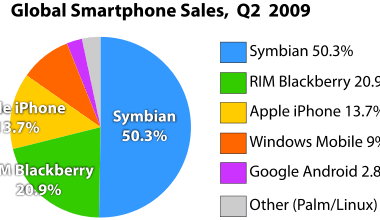
    Smartphone sales per OS vendor

    Stats from June 09 shows Symbian being the clear leader on Mobile OS market, thanks to Nokia and a few Sony Erricson and Samsung devices.

    (data does not include Palm WebOS, which was introduced in June, 2009)Market share of Smartphone operating systems as of Q2/2009 by Canalys.[5] (data does not include Palm WebOS, which was introduced in June, 2009)

    Market share of Smartphone operating systems as of Q2/2009 by Canalys.

    It will be interesting to see what the chart will be for Q2 2010 with new Android phones introduced every week or so, Windows UX-focused Mobile 7 and Samsung’s Linux-based Bada.

  • Nov 11th, 2009

    Windows Mobile 6.5 UI issues and Windows Mobile 7

    ZDNet reports that Windows Mobile 7 is on track for release to OEMs for testing. It is interesting to see what MS can come up with in the new highly competitive market. Android, Sumsung’s just announced Bada, iPhone OS, Symbian^2 – the first open version of Symbian’s OS.

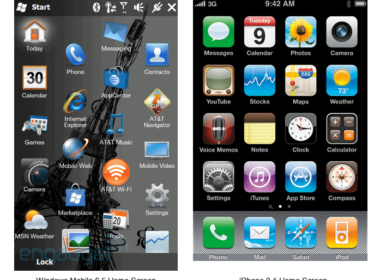
    Windows 6.5 was not up-to-speed with the competition. The UI is complex and hard to use. But, intuitiveness has never been a strong point of MS products. Here is a small analysis of the Windows 6.5 home screen from usability prospective.

    Windows 6.5 and iPhone 3.1 Home screen comparison

    Windows 6.5 and iPhone 3.1 Home screen comparison

    The iPhone 3.1 home screen is an ample or much better and usable approach. And here’s why the Windows 6.5 screen isn’t as intuitive.

    • Uneven grid in additional to uniquely shaped icons makes it look untidy and harder to scan.
    • Inconsistent icons style.
    • Background under the icons makes it harder to scan the screen.
    • Icons are allowed to have unique shape, which theoretically helps to find an icon but the current implementation presents 2 problems:
      • Icons are not consistent for some have unique share and some just use rounded corner “iphone” frame.
      • Without knowing what background colour might be there is high probability or poor visibility of the icon for lack of contrast. (Camera icon and AT&T Music illustrate the problem).

    It may be hard for Windows Mobile to recapture the market unless they make it really usable and appealing to end-users.

  • Nov 10th, 2009

    Usability over Aesthetics

    I really admire good design, a tasteful colour palette and the fine finish of all UI elements. But Google pays no attention to any of it. Their design is completely data driven and they are known for things like testing 64 shades of blue for few months before deciding on the colour of the box boarder. And still I find myself dumping the beautiful Apple Mail for Gmail. I bought Things – a most eye-catching app that scored Apple Design Award and yet find myself using Gmail Tasks. Beautifully designed iCal is also an app I rarely open, opting for Google Calendar instead.

    What’s the reason? Usability I guess. Google is an adept in making usable apps. All their apps are highly intuitive and usable, albeit ugly. I save great deal of time when I have all apps in one window talking to each other. The ugliness of design elements does bother me but the usability pays me back in time saved.

    I guess to justify Google’s approach to UI, they need to think about every bite going through their server with the amount of data they process. To a certain degree they comply with a basic rule of design: Take out everything that is not necessary until you can’t anymore and then you have a well designed product. (Michelangelo used to joke that his trade is very easy. Take a rock and cut off everything unnecessary).

  • Nov 10th, 2009

    New Website Launched

    Rossul.com has been launched with completely new design and architecture structure. We’ve worked hard making it more focused on our main business  - design of Usable Graphical User Interfaces for both Web and Desktop Apps, Web portals and complex websites.

  • Nov 10th, 2009

    TweetBoard Alfa

    TweetBoard makes Twitter available right on your website. The window is dynamic and doesn’t get in the way. It seems to be very cool and usable way to facilitate your marketing efforts and may be even communicate with your customers. We are awaiting alfa testing approval and will let you know about integration process and usability of the product.

    tweetboard

    Tweetboard

  • Nov 10th, 2009

    Apple’s MagicMouse – Most usable mouse ever

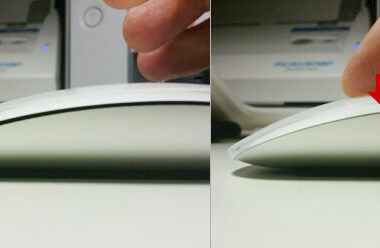
    MagicMouse is a great a very well designed device. I got it on the first date they were available and spent about 10 days using it. The mouse is great. Very responsive and  precise. Still runs on the original batteries with about 40% charge left which means it will go for about about 3 weeks.

    The gestures work great. Very usable . Especially swiping back though web pages. Scroll with momentum works and feels exactly as one in iPhone, which is very intuitive and beats Logitec’s Hyper-fast scrolling feature.

    Apple's MagicMouse

    Apple's MagicMouse

    The only 2 things bother me so far and they are really minor. First is that the thumb is positioned over 2 movable parts which creates a strange feeling that took me few days to get used to. The other thing is that if your hand are wet for any the fingers won’t “swipe” over mouse plastic making gestures almost impossible.

    So if you live in a hot place with high humidity without an air conditioning MagicMouse not may be a mouse of choice for you. In any other case – highly recommended.

  • Nov 10th, 2009

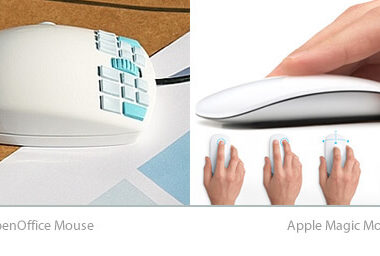
    OpenOffice Mouse – 7 buttons for each finger

    After debut of Apple’s Magic Mouse - a super well and smartly designed piece of hardware  OpenOffice Mouse produces mixed feeling. The bulky and very impressive design that places 7 buttons under each finger might require an extensive training to use. (Piano players will have a definite advantage using it). Thumb button makes it look like a toy form Master Mind.There is differently coloured version of on OO website but it doesn’t really help.

    OpenOffice Mouse

  • Nov 9th, 2009

    Design in use – Rozetkus 3D

    Here is a good example of what design should do for us making our everyday life a bit easier. Art Lebedev – a russian design studio that come up few years back Optimus Keyboard (1257.14€) is back with a useful concept that does solve a real problem in hand. Rozetkus 3D looks like any other socket but with a push of the button above, it pops our giving you access to additional sockets. Smartly done concept and seems to be simple in production.

    Art Lebedev's Rozetkus 3D socket concept

    Art Lebedev's Rozetkus 3D socket concept

  • Nov 7th, 2009

    Quiet Read by Bambooapps

    Quiet Read is a small app beautiful in it’s simplicity and usability. A good example of design providing solution to a problem. I think it is going to be quite popular for several reasons. It does one thing and does it well. It’s got well designed UI that doesn’t draw unnecessary attention and blends well in your desktop environment. And it is free.

    Quiet Read

    Quiet Read

  • Nov 5th, 2009

    Elia has a masterful way of translating technical and branding requirements into creative, attractive and eye catching website designs. Elia has delivered great results time and time again.

    Cathy McKnight,PMP, Senior Consultant at Prescient Digital Media

  • Nov 5th, 2009

    Vista and Windows 7 GUI mystery

    When I first saw Vista my initial reaction was “what the heck?!”. It wasn’t incompatibility, performance, nor stability that caught my attention. What amazed me at that time was Vista GUI, which now seems that it will transferred over to Windows 7. So what is so special about it? To tell you the truth I can’t see much logic behind it.

    Windows 7 Desktop Screenshot

    Windows 7 Desktop Screenshot

    Windows 7 semi-transparent windows frames

    Wallpaper is the most obvious way to personalize the human-computer interaction experience. All OS vendors provide an easy way to customize it. We use personal photos, stock photography or even rotate set of images. Desktop (wallpaper  for Windows users) is traditionally given to a user to make  the computer interaction experience more “personal”. As a result the OS GUI designers have no way to predicting  thewallpaper color or image palette.

    Fancy background colors can be very distracting. A logical move for designer would be to isolate a user form potentially distracting desktop environment so that they can focus on task on hand.  MS decides not to do that and  introduce transparent windows instead. On top of that they blur content underneath the window (making it very clear how hard it is to use a computer if you can’t find your glasses). Note that about a year ago Apple tried to introduce atransparent tiny bar on top of the screen and had to back down from making this feature optional due to user complains.

    Transparent windows immediately great another problem. Blind window titles. Making them dark doesn’t make them readable on a dark background and white wouldn’t work on bright wallpaper. Many designers would say, “Hey! Something is wrong here. Let’s backup.”Instead Microsoft habitually chooses to apply a “patch” and so introduces a white glow around letters.

    Incidentally, the need for patches is a sign of weak design structure and of logic flaws in the original design. Not only the GUI design. Any design in general (not to be confused with ”art”). Good design tends to achieve the maximum with the minimum. Any design is a structure or set of rules based on a certain logic — physical or abstract. For example we can look at a chair as a set of physical rules. If your design requires you to introduce a 5th leg and then in turn 2 small legs to support that 5th then you may want to start from the beginning and rethink the original concept. GUI design is no exception. OK, back to Windows issues.

    Windows7 GUI Transparent frames. Transparent on blur on transparent over blur

    Windows7 GUI Transparent frames. Transparent on blur on transparent over blur

    Not only is the user presented with information he or she doesn’t require but this information is also unusable. Why is it required for a user to see the text underneath a window coloured blued to the point of unreadabilty? If my wallpaper is colorful enough my windows will inherit the colors and will all look different, which violates the very core rule of consistency for similar elements.

    Window Titles

    The absence of windows titles is an equally strange decision. Window titles oddly position inside the main frames, which makes them potentially invisible if several windows are open. Try to understand what is the third window on the above image (the one above the clock).

    Windows titles

    Windows titles

    Other Issues

    Another issue worth mentioning is the window footer icon. I’m not sure why they need this icon there in the first place, but it is strange to have the footer height dictated by the icon size.

    Windows7 Finder Window Footer

    Windows7 Finder Window Footer

    Active/inactive rules set in windows clearly don’t apply to widgets. They are in the background but  behave as active windows, with strong shadows and no faded colors.

    Summarizing, it looks like Microsoft’s patching practice will also be applied to the GUI of upcoming Windows7. It also quite apparent that many visual effects have nothing to do with optimizing user experience and just follow the “rich” GUI trend.

    To be continued…. (probably)

  • Nov 4th, 2009

    Aggressive Online Advertisement

    Floating windows are most annoying kind of internet advertisement according to Russian internet statistic agency.

    Floating window example

    • Floating windows bother 78% of internet users
    • Banners bother 7.6%
    • Video ads bother 3.6%

    Only 3.4% of users are actually order something using advertisement links.

  • Nov 4th, 2009

    Website Link colour

    Surveys shows that average users still prefer blue text links over other colours even if they are consistent across the site. This probably doesn’t apply to web apps such as intranet site, gmail, etc that users use on daily basis.

  • Nov 4th, 2009

    Touch screen tactile feedback and user satisfaction survey

    A survey recently conducted (France, Germany and the UK) showed 38% were planning to get a touchscreen on their next mobile phone while only 47% of people who already owned a touchscreen said they would get another one. In other words, less than half of touchscreen owners thought they’d stick with the technology on their next purchase. Apple has a high customer satisfaction rate and since iPhone is the only available device iphone users don’t really have a choice.

    As a designer I can’t help but love the idea of one surface that becomes what one needs it to be at the moment. I’m not moving back to physical keyboard. At least on my phone.
    I don’t play many games on my iPhone and when I do tactile feedback is not something I miss.

    The possibility of tactile feedback was mentioned in the original iPhone patent application and last year Apple filled “Keystroke tacility arrangement on a smooth touch surface” patent. It desscribes various tactile feedbacks on a smooth sureface keyboard such as:

    • Braille-like dot pairs or bars at key centers
    • Articulating frame that protrudes at key edges during typing
    • Articulating frame that deforms surface cover at key edges during typing
    • Rigid frame under key edges with compressible key centers

    We may see it implemented in rumoured Apple Tablet Mac that supposedly should surface in next few months. So it looks like touchscreen are going to become smarter and more “user-freiendly”.

  • Nov 2nd, 2009

    Useful text editing shortcuts (Mac OS X)

    I came across few useful text editing shortcuts for Mac OS X @ www.ss64.com – a site dedicated to all kinds of applications/os syntax…

    Editing Text (email, TextEdit, Pages, etc)

       ←       Move one word left
       →       Move one word right
       ←       Beginning of line
       →       End of line
                Scroll one page up (cursor retains position)
                Scroll one page down (cursor retains position)
               Move one page up  (reposition cursor)
              Move one page down
      ↑ or   Scroll to beginning of document
       ↓ or   Scroll to end of document
    
      Add shift key  to the above to also SELECT the text.
    
      ⌥ ⌫       Delete word
       Del     Delete next word
    
       Scrollbar           Jump to exact scrollbar location
       Scrollbar arrows    Scroll page at a time (page up/down)
       Volume up/down      Open Sound preferences
       Brightness up/down  Open Display preferences

  • « Older Entries

News

Jul 16th

Rossul Design has been contracted to create a new Graphic User Interface (GUI) for online Virtual Dating Chat.

Jun 6th

Rossul Design has been hired by Centtric to design UI for their upcoming salesforce.com App.

Jun 6th

We are excited about a this new and very insetting project for ePly – a complete online event registration and payment processing service that manages every step of the online form creation process and eliminates the event planner’s stress and workload.

May 31st

Rossul Design has been chosen to update Graphic User Interface (GUI) for UofT Alumni website. Established in 1827, the University of Toronto is Canada’s largest university, recognized as a global leader in research and teaching.

Testimonials

Elia is a talented UI designer. His designs are as functional and intuitive as they are beautiful. He is highly professional and gets the job done fast. I recommend Rossul Design without reservation. Thank you for a fantastic job!

Dr. Igor Kotlyar, president at OmniDate Inc.

Elia and Rossul Design have been a pleasure to work with. Their professionalism and insight into the re-launch design of our flagship Easy Web Video product has left me very proud of the final design. For anyone looking for a stunning, effective, intuitive design customized to the uniqueness that is every small business I recommend Rossul Design wholeheartedly.

Thanks for everything Elia!

Shawn Pringle, CEO at TopNet Solutions, Inc.