UX/UI Design and Development for
Solar Simulator Software

A high-performance platform built for scientists and engineers in solar research

Overview

Solar researchers judge a simulator by its hardware, then spend their days fighting its software. Our client, a maker of advanced LED solar simulators, had exactly that problem: instruments that set the industry standard, controlled through an interface that slowed experiments and put people off using them. We redesigned and rebuilt the control software end to end. Setting up an experiment now takes fewer steps, new users get productive without lengthy training, and results are easier to reproduce.

Challenges

The hardware set the industry standard; the software held it back. Replicating a solar spectrum for a test took too many steps, and the learning curve was steep enough that valuable time went to training instead of research. For a company selling precision instruments, the control interface had become the weakest part of the product.

Our Approach

Discovery & Research

We interviewed the client's engineers and scientists to understand their workflows and technical needs, then validated our design concepts with usability testing throughout the project.

User Personas

We built personas spanning the new hire to the seasoned expert, so the design serves every level of user without oversimplifying complex scientific tasks.

Collaborative Design

We worked directly with the engineering and science teams, which kept our solutions technically feasible and aligned with the APIs and hardware capabilities.

Workflow Mapping

We mapped end-to-end scientific workflows, from laboratory test setup through data analysis. This let us identify friction points and opportunities for optimization, and those insights guided the overall design strategy.

Iteration & Refinement

Every major feature went through several rounds of design, tested with the people who would use it. Controls had to feel obvious to scientists and engineers even in complex scenarios. By introducing polished, human interactions, the platform feels closer to a well-made modern application than to a typical dry lab tool.

Solution

Everything in the interface serves the experiment. Researchers set a light spectrum, run a test, and read the results without wrestling the tool in between, and the software quietly enforces the procedural discipline that reproducible science depends on.
Customizable Light Spectrum Presets

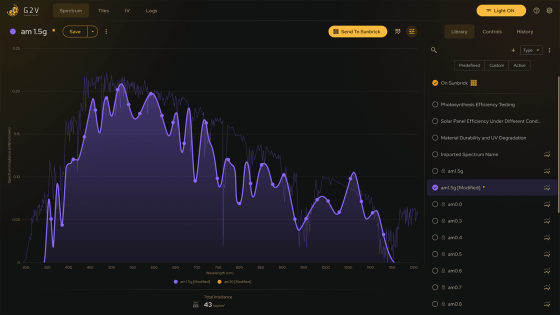
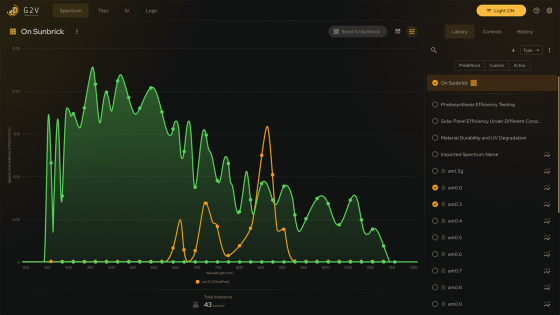
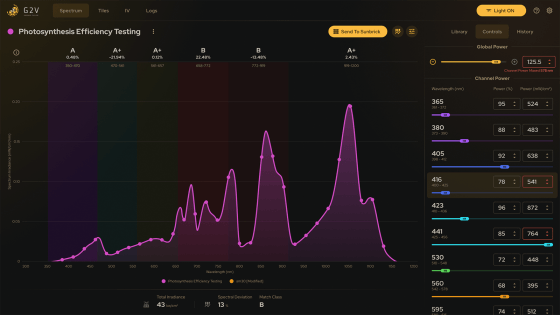
The application provides a library of spectrum presets that replicate different lighting conditions at specific times and locations. Researchers can adjust these presets, save unique parameter sets, and send them to the simulator’s tile frame for accurate simulation. This makes it possible to create reproducible experiments while tailoring the light spectrum to highly specific research needs.

Streamlined Scientific Workflows

We restructured the user journey to simplify the process of selecting a spectrum, running a test, and exporting data. By reducing unnecessary steps, we made time-sensitive experiments faster, more reliable, and less prone to user error.

Precise Channel Power Adjustments

The interface provides direct control of each spectrum channel using sliders and numeric entry fields. Visual indicators update in real time on the spectrum chart, giving researchers an immediate and intuitive connection between their adjustments and experimental output.

Interactive Spectrum Visualization

Researchers edit the spectrum directly on the chart with drag actions, or type exact values when precision matters. Every change shows instantly, so validating a setup takes seconds instead of a round trip through menus.

Tile Monitoring and Status Visualization

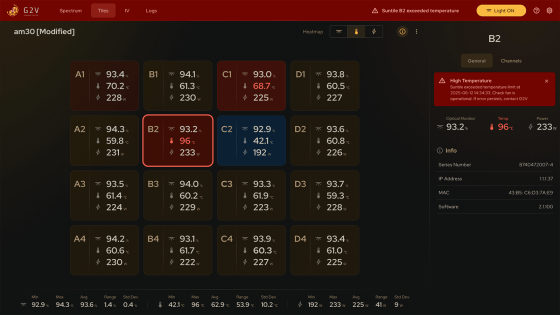
A visual tile map displays the status of every LED tile module, with key metrics such as temperature, optical monitor readings, and power output. Heat legends and color coding highlight anomalies, while detailed views provide diagnostic insights for troubleshooting.

Polished User Experience

We brought the level of finish usually reserved for commercial products into a lab setting: the interface feels modern and approachable while handling highly complex workflows.

Development

Windows Desktop Application

We built a robust Windows desktop application using React for the UI and Electron for packaging. This gave the software a native-like experience with modern maintainability.

Hardware & API Integration

The Node.js backend enabled fast and reliable communication with the simulator hardware. We also integrated Keithley's Source Measure Unit (SMU) instrument to consolidate control into one cohesive system.

Optimized Spectrum Interaction

Because spectrum math is complex and each channel adjustment can affect others, we invested in optimizing chart interactions to feel snappy and precise. This ensures researchers experience smooth, responsive feedback that accurately reflects hardware behavior, even during rapid adjustments.

Well-Structured Code and Documentation

Alongside the application, we delivered clean, well-structured code and detailed documentation. This ensured the client’s development team could maintain the software effectively and extend it with confidence.

Results

Our UX design and development transformed the software from a barrier into a trusted research tool, aligned with the hardware it controls.

Experiment setup takes fewer steps, and standardized workflows make results easier to reproduce.
Simplified operation cut training time for new scientists and engineers.
Fully accessible design aligned with WCAG and AODA standards for inclusive research environments.
The software now reflects the sophistication of the hardware: consumer-grade polish that builds trust in the platform and the instruments it runs. Projects like this one span design and engineering in a single team. See how we approach custom application development.

Let's Work Together

We design and build enterprise software that pairs scientific precision with an interface people actually enjoy using. If you are looking to modernize your enterprise software or scientific platform, we’d love to collaborate. Fill out the contact form below and our team will be in touch to discuss your project.

    Your privacy is important to us. We will only use your information to respond to your inquiry. We will never sell or share your data with anyone.

    Schedule a Meeting